PDF To WORD Converter
PDF To MS Doc Converter
 Editable - Edit Your PDF Documents In MS WORD. High Quality - Keep ALL Text and Graphic Data. Easily - Convert PDF documents To WORD Format Just In Only 3 Clicks. Decyption - Auto Decrypt Restricted PDF docs To WORD Format. Batch Mode - Convert HUNDREDS of PDF Documents at One Time.
Convert PDF Now!
File Size: 14.3MB OS: Windows XP/2003/Vista/7/8/10 or Later

Want to Convert Word to PDF in Bulk? Please check Batch Word to PDF Converter
Screenshot
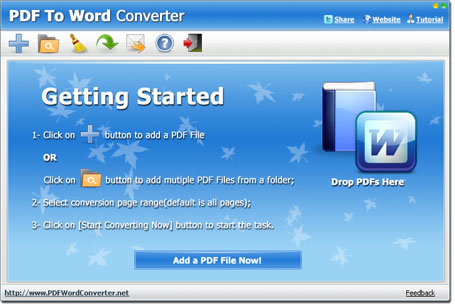
How To Use - Tutorial
(1) Add PDF files you want to convert.
(2) Set Page Range and output path.
(3) Click the Start Converting Now button to start converting.
How To Convert - Tutorial
Key Features
Convert PDF to MS WORD
Convert PDF to Doc format, you can edit PDF content in MS WORD. No Need Microsoft WORD Installed
The converter can convert PDF to MS WORD without Microsoft WORD installed.Auto Decyption
The program will decrypt Restricted PDF files to WORD docs automatically.Full Conversion
This converter will not only convert text, but also keep all PDF graphic information into WORD result file.Easy To Use
With the converter, you can convert PDF documents to WORD in only 3 Clicks.Fast Conversion
the program conversion engine is 170% faster than other PDF converters.Batch Mode
You can convert Hundreds of PDF documents to WORD DOC files with batch mode.PDF Converters Pack Special Promotion
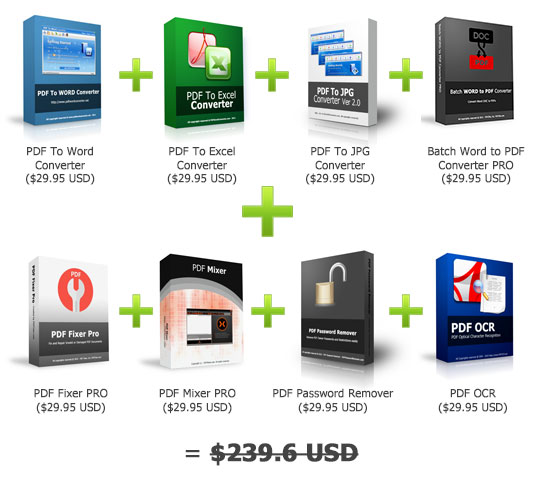
Now for only $49.95 USD!
More than 79% OFF!
Check More Details!
PDF To Word Converter Software
The PDF To Word Converter is a software tool designed for Windows users. It is the tool you need to convert your PDF files to a MS Word Doc format. It is extremely quick, user-friendly and thorough. Anybody who has to do several PDF to Word format conversions should download this application right now. With just a few clicks it will do what you want. Even when PDF files are encrypted, the PDF To Word Converter does its work efficiently. It is a handy tool that will decrypt any restricted PDF document and transform it to a functional Word format document.
Another amazing fact about this Windows application is that it can do batch conversions. Instead of converting one file at a time, you will be able to use its Batch Mode to convert several PDFs to a MS Word Doc format. So it will save your time. In addition, the PDF To Word Converter is able to alter scanned PDF files. Files with this format consist of images rather than texts. However, the PDF To Word Converter has a built-in English OCR engine which could convert the scanned PDF files to plain text. However, the built-in OCR engine could only work for scanned PDF files in English language. If you need to OCR scanned PDF files in other languages, please try PDF OCR.
This converter can also convert PDF files to Google Docs. Please check the article How to Convert PDF to Google Doc.
PDF To Word Converter System Requirements
If you want to use this document format conversion tool, you should first ensure that your computer could accept it. This tool is compatible with almost all Windows systems: Windows ME, Windows 2000, Windows 2003, Windows XP, Windows 7, Windows 8, and Windows Vista. Owners of the Pentium III processor, Pentium 4 or a better version can also download the PDF To Word Converter. A computer with 256MB of RAM or more, such as 512MB RAM, is much recommended. Finally, you need up to 100MB of hard disk space to install this Windows tool.
How to Convert a PDF File to a Word File
1. Download PDF To Word Converter - Simply visit PDF To Word Converter Download Page and follow simple instructions.
2. Carry out the Installation process - As you do with all other downloads, double-click your downloaded file (pdf2word.exe) to trigger the installation process.
3. Run your file - No special knowledge is needed to do this as an interface with instructions will appear. Simply follow them.
4. Place files on the File list by clicking either Add Folder Button or Add Button. The options will enable you to select and add one or several PDF files from a given folder to the converter file list.
5. Create your Output Path by clicking the Browse button. This will show you the folder path where your newly converted Word Doc files will go to.
6. Begin the conversion procedure - Just by clicking the Start Converting Now button, the process of conversion will start.
After doing the above-mentioned steps carefully and correctly, wait for the converter tool to do its perfect work. If you still have doubt, here are the advantages of getting this Windows application.
- It is editable and so it will allow you to alter your PDF files in MS Word
- The tool preserves all graphic and text content during the conversion process
- The process of converting PDF files to Word format documents is idiot-proof
- The tool decrypts encrypted PDF files automatically and then converts them to Word.
- It offers a Batch Mode that enables the user to convert hundreds of files at a time
Besides being a quick and user-friendly tool, this PDF To Word Converter tool does not need you to install MS Word first so it can do its work. So, just download it now.
Awards

Features
- Easy To Use
- Fast Conversion
- Batch Mode
- Auto Decryption
Resources
Why You Need It
Before downloading the Converter, you may ask, what's the difference between PDF To WORD Converter and other PDF converters? First, as you know, normally PDF files can not be edited or modified. our converter product allows you to convert your PDF documents to editable WORD format, which you can modify or copy the content text on... Read More...
Intro
PDF To WORD Converter is a windows application to convert PDF files To WORD Doc format fast and easily. With the converter, users can convert PDF files to WORD format in few clicks.
This program can automatically decrypt restricted PDF files to WORD format.
Also, it supports Batch Mode to convert hundreds of PDF documents to MS WORD files at one time.
>>DOWNLOAD NOW
Other Products
PDF Editor
Protect PDF from Copying
Modifier PDF
PDF Merger Mac - Combine PDF (Mac)
PDF Bearbeiten